
Scanning and the disk map
What a scan measures
- Home folder scans everything under your home folder, hidden folders included.
- Whole data volume scans
/System/Volumes/Data, which holds your users, apps and data (macOS itself lives on a separate, read-only volume).
OpenDisk walks folders in parallel and adds up the space each file really uses on disk (its allocated blocks), not its nominal size. A sparse 64 GB Docker.raw that only uses 12 GB counts as 12 GB. Files that are hardlinked in several places are counted once. Symlinks are never followed, and the scan never crosses into another disk or volume.
You can cancel a scan at any time.
The disk map
The Disk map tab shows the scan as nested blocks: the bigger the block, the more space. It shows two levels at a time; click a block to open it and use the path at the top (or ↑ Up) to go back.
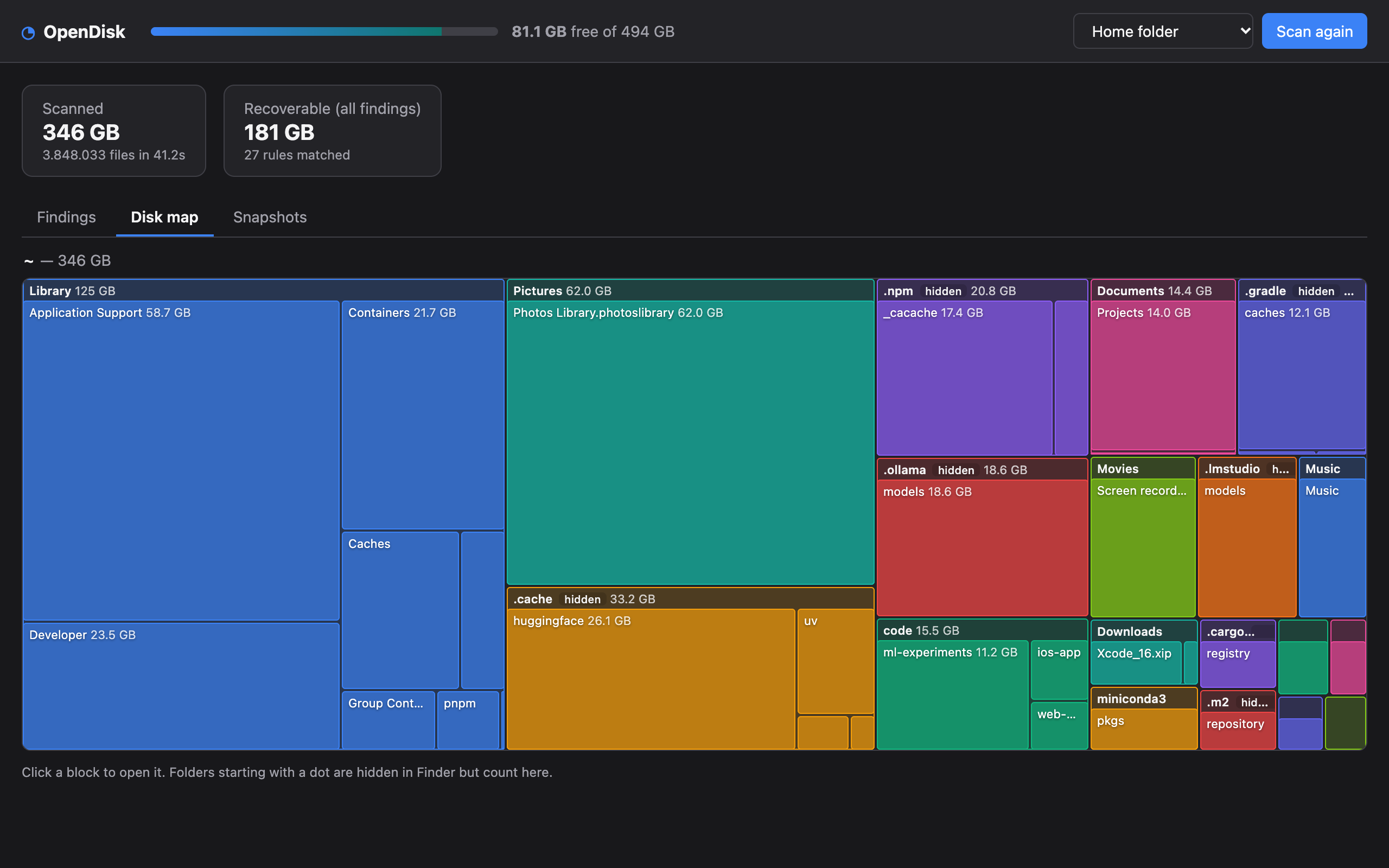
Folders whose name starts with a dot (.npm, .cache, .gradle, .ollama…) are marked hidden: Finder hides them, which is why they are so often where the space goes. Folders OpenDisk could not read are marked when you hover them; see Full Disk Access.
The many small folders of a level are grouped into one striped block so the map stays readable.
Scan history
Each finished scan is saved in a small local database (~/Library/Application Support/OpenDisk/index.sqlite), with folder sizes a few levels deep. A future version will use it to show what grew since the last scan.