Getting started
Calco is an iPad app for drawing sprite animations by hand: a character's idle, walk, jump and attack, frame by frame, ready to drop into a game.
What you see
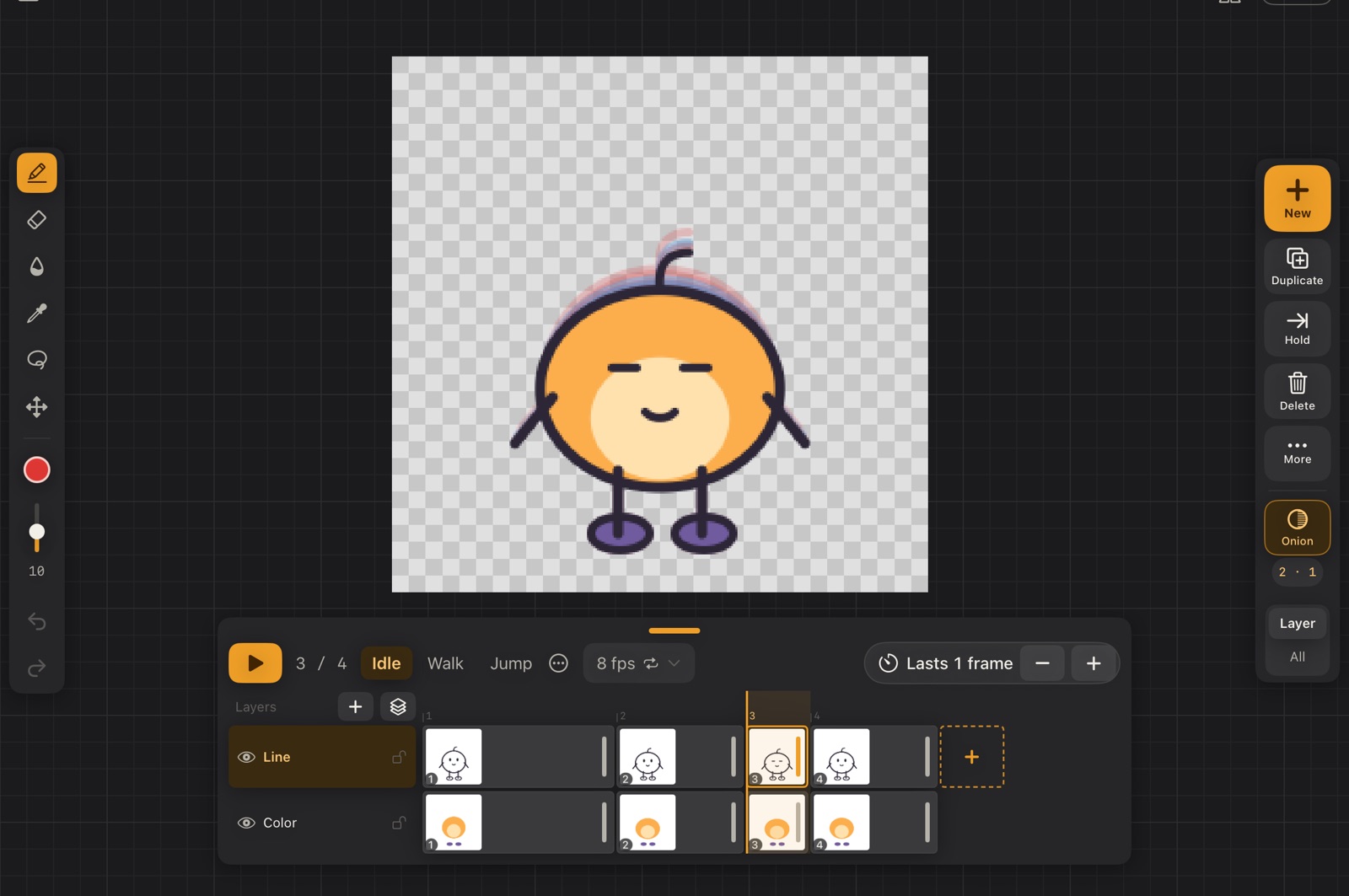
The canvas fills the whole screen, on a faint grid, and the panels float over it: the drawing always fits in the space they leave free. The editor has five areas:
| Area | What it does |
|---|---|
| Tool rail (left, centred) | Brush, eraser, fill, eyedropper, select, move, colour, size, undo and redo. See Drawing tools. |
| Canvas (centre) | Where you draw. Pinch to zoom, two fingers to pan and rotate. |
| Animation rail (right, centred) | New drawing, duplicate, hold, delete, more, the onion skin, and whether they act on the layer or every layer. See Timeline and drawings. |
| Top bar | The file menu on the left; flip view and Zen mode on the right. |
| Timeline (bottom, centred) | Playback, clips, the frame length, and the layers with their drawings. See Timeline and drawings. |
Your first animation in five steps
- In the gallery, tap New, choose a sprite size and the clips you need (Idle, Run…), and tap Create and start drawing. See Gallery and projects.
- Draw the first pose with the Apple Pencil on the Line layer.
- Tap the big orange + New at the top of the right rail to add the next drawing. The previous one shows faded in red (the onion skin) so you can follow it.
- Repeat, then tap ▶ to play. Change the speed in 12 fps ⌄, or make a drawing last longer with Lasts N frames.
- Open the file menu → Export… and pick a profile, for example Unity. See Export to your game.
Everything saves on its own
Projects live in the gallery and save automatically when you leave the editor or the app goes to the background. Save (⌘S) is there if you want to be sure.
A quick vocabulary
- Project: one character or object, with its canvas size and speed.
- Clip: one animation of that character (Idle, Walk, Jump). Each clip is exported as its own animation.
- Layer: a sheet stacked on the others, like line art on top of colour.
- Drawing: what one layer shows for a while. A drawing can last several frames.
- Frame: one step of the clip. Its length is counted in ticks of the clip's fps.